服务消费者
服务消费者
RestTemplate
在Spring中,提供了RestTemplate。RestTemplate是Spring提供的用于访问Rest服务的客户端。而在SpringCloud中也是使用此服务进行服务调用的。
创建bill-service项目
新的模块初始化三部曲:
- pom.xml
- 启动类
- 配置文件
pom.xml 添加如下内容:
        <dependency>
            <groupId>org.springframework.cloud</groupId>
            <artifactId>spring-cloud-starter-netflix-eureka-client</artifactId>
        </dependency>
全量内容如下:
\<?xml version="1.0" encoding="UTF-8"?\>
<project xmlns="http://maven.apache.org/POM/_4.0.0" xmlns:xsi="http://www.w3.org/2001/XMLSchema-instance"
         xsi:schemaLocation="http://maven.apache.org/POM/4.0.0 https://maven.apache.org/xsd/maven-4.0.0.xsd"\>
    <modelVersion>4.0.0</modelVersion>
    <parent>
        <groupId>org.springframework.boot</groupId>
        <artifactId>spring-boot-starter-parent</artifactId>
        <version>2.3.6.RELEASE</version>
        <relativePath/> \<!-- lookup parent from repository --\>
    </parent>
    <groupId>com.luffy</groupId>
    <artifactId>bill-service</artifactId>
    <version>0.0.1-SNAPSHOT</version>
    <name>bill-service</name>
    <description>Demo project for Spring Boot</description>
    <properties>
        <java.version>1.8</java.version>
        <spring-cloud.version>Hoxton.SR9</spring-cloud.version>
    </properties>
    <dependencyManagement>
        <dependencies>
            <dependency>
                <groupId>org.springframework.cloud</groupId>
                <artifactId>spring-cloud-dependencies</artifactId>
                <version>${spring-cloud.version}</version>
                <type>pom</type>
                <scope>import</scope>
            </dependency>
        </dependencies>
    </dependencyManagement>
    <dependencies>
        <dependency>
            <groupId>org.springframework.boot</groupId>
            <artifactId>spring-boot-starter</artifactId>
        </dependency>
        <dependency>
            <groupId>org.springframework.cloud</groupId>
            <artifactId>spring-cloud-starter-netflix-eureka-client</artifactId>
        </dependency>
        <dependency>
            <groupId>org.springframework.boot</groupId>
            <artifactId>spring-boot-starter-web</artifactId>
        </dependency>

        <dependency>
            <groupId>org.springframework.boot</groupId>
            <artifactId>spring-boot-starter-test</artifactId>
            <scope>test</scope>
        </dependency>
    </dependencies>

    <build>
        <plugins>
            <plugin>
                <groupId>org.springframework.boot</groupId>
                <artifactId>spring-boot-maven-plugin</artifactId>
            </plugin>
        </plugins>
    </build>

</project>
BillServiceApplication
package com.luffy.billservice;

import org.springframework.boot.SpringApplication;
import org.springframework.boot.autoconfigure.SpringBootApplication;
import org.springframework.cloud.client.discovery.EnableDiscoveryClient;

@SpringBootApplication
@EnableDiscoveryClient
public class BillServiceApplication {
    public static void main(String[] args) {
        SpringApplication.run(BillService.class, args);
    }
}
application.yml
server:
  port: 7001
eureka:
  client:
    serviceUrl:
      defaultZone: ${EUREKA_SERVER:http://admin:admin@localhost:8761/eureka/}
  instance:
    instance-id: ${eureka.instance.hostname}:${server.port}
    prefer-ip-address: true
    hostname: ${INSTANCE_HOSTNAME:bill-service}
    #eureka客户端需要多长时间发送心跳给eureka服务器,表明他仍然或者,默认30秒
    lease-renewal-interval-in-seconds: 2
    #eureka服务器在接受到实例的最后一次发出的心跳后,需要等待多久才可以将此实例删除
    lease-expiration-duration-in-seconds: 2
spring:
  application:
    name: bill-service
BillController
package com.luffy.billservice.controller;

import org.springframework.beans.factory.annotation.Autowired;
import org.springframework.context.annotation.Bean;
import org.springframework.web.bind.annotation.GetMapping;
import org.springframework.web.bind.annotation.RestController;
import org.springframework.web.client.RestTemplate;

@RestController
public class BillController {

    @Bean
    public RestTemplate restTemplate() {
        return new RestTemplate();
    }

    @Autowired
    private RestTemplate restTemplate;

    @GetMapping("/bill/user")
    public String getUserInfo(){
        return restTemplate.getForObject("http://localhost:7000/user", String.class);
    }
}
问题:
- 服务调用采用指定IP+Port方式,注册中心未使用
- 多个服务负载均衡
使用注册中心实现服务调用
修改BillController
package com.luffy.billservice.controller;

import org.springframework.beans.factory.annotation.Autowired;
import org.springframework.cloud.client.loadbalancer.LoadBalanced;
import org.springframework.context.annotation.Bean;
import org.springframework.web.bind.annotation.GetMapping;
import org.springframework.web.bind.annotation.RestController;
import org.springframework.web.client.RestTemplate;

@RestController
public class BillController {

    @Bean
    @LoadBalanced
    public RestTemplate restTemplate() {
        return new RestTemplate();
    }

    @Autowired
    private RestTemplate restTemplate;

    @GetMapping("/bill/user")
    public String getUserInfo(){
        return restTemplate.getForObject("http://user-service/user", String.class);
    }
}
访问测试
总体来说,就是通过为加入@LoadBalanced注解的RestTemplate添加一个请求拦截器,在请求前通过拦截器获取真正的请求地址,最后进行服务调用。
友情提醒:若被@LoadBalanced注解的RestTemplate访问正常的服务地址,如http://127.0.0.1:8080/hello时,是会提示无法找到此服务的。
具体原因:serverid必须是我们访问的服务名称 ,当我们直接输入ip的时候获取的server是null,就会抛出异常。
如果想继续调用,可以通过如下方式:
package com.luffy.billservice.controller;

import org.springframework.beans.factory.annotation.Autowired;
import org.springframework.beans.factory.annotation.Qualifier;
import org.springframework.cloud.client.loadbalancer.LoadBalanced;
import org.springframework.context.annotation.Bean;
import org.springframework.web.bind.annotation.GetMapping;
import org.springframework.web.bind.annotation.RestController;
import org.springframework.web.client.RestTemplate;

@RestController
public class BillController {

    @Bean
    @LoadBalanced
    public RestTemplate restTemplate() {
        return new RestTemplate();
    }

    @Autowired
    private RestTemplate restTemplate;

    @Bean("normalRestTemplate")
    public RestTemplate normalRestTemplate() {
        return new RestTemplate();
    }

    @Autowired
    @Qualifier("normalRestTemplate")
    RestTemplate normalRestTemplate;


    @GetMapping("/service/user")
    public String getUserInfo(){
        return restTemplate.getForObject("http://user-service/user", String.class);
    }

    @GetMapping("/normal")
    public String normal() {
        return normalRestTemplate.getForObject("http://localhost:7000/user", String.class);
    }
}
Ribbon 负载均衡
再启动一个user-service-instance2,复制user-service项目
修改user-service-instance2的application.yml的server.port
server:
  port: 7002
eureka:
  client:
    serviceUrl:
      defaultZone: ${EUREKA_SERVER:http://${EUREKA_USER:admin}:${EUREKA_PASS:admin}@localhost:8761/eureka/}
  instance:
    instance-id: ${eureka.instance.hostname}:${server.port}
    prefer-ip-address: true
    hostname: ${INSTANCE_HOSTNAME:user-service}
    #eureka客户端需要多长时间发送心跳给eureka服务器,表明他仍然或者,默认30秒
    lease-renewal-interval-in-seconds: 2
    #eureka服务器在接受到实例的最后一次发出的心跳后,需要等待多久才可以将此实例删除
    lease-expiration-duration-in-seconds: 2
spring:
  application:
    name: user-service
修改user-service-instance2的UserController.java,为了可以区分是哪个服务提供者的实例提供的服务
package com.luffy.userservice.controller;


import com.luffy.userservice.entity.User;
import org.springframework.web.bind.annotation.GetMapping;
import org.springframework.web.bind.annotation.PathVariable;
import org.springframework.web.bind.annotation.RestController;

import java.util.Random;

@RestController
public class UserController {

    @GetMapping("/user")
    public String getUserService(){
        return "this is user-service-instance2";
    }

    @GetMapping("/user-nums")
    public Integer getUserNums(){
        return new Random().nextInt(100);
    }

    //{"id": 123, "name": "张三", "age": 20, "sex": "male"}
    @GetMapping("/user/{id}")
    public User getUserInfo(@PathVariable("id") int id){
        User user = new User();
        user.setId(id);
        user.setAge(20);
        user.setName("zhangsan");
        user.setSex("male");
        return user;
    }
}
访问bill-service,查看调用结果(默认是轮询策略)
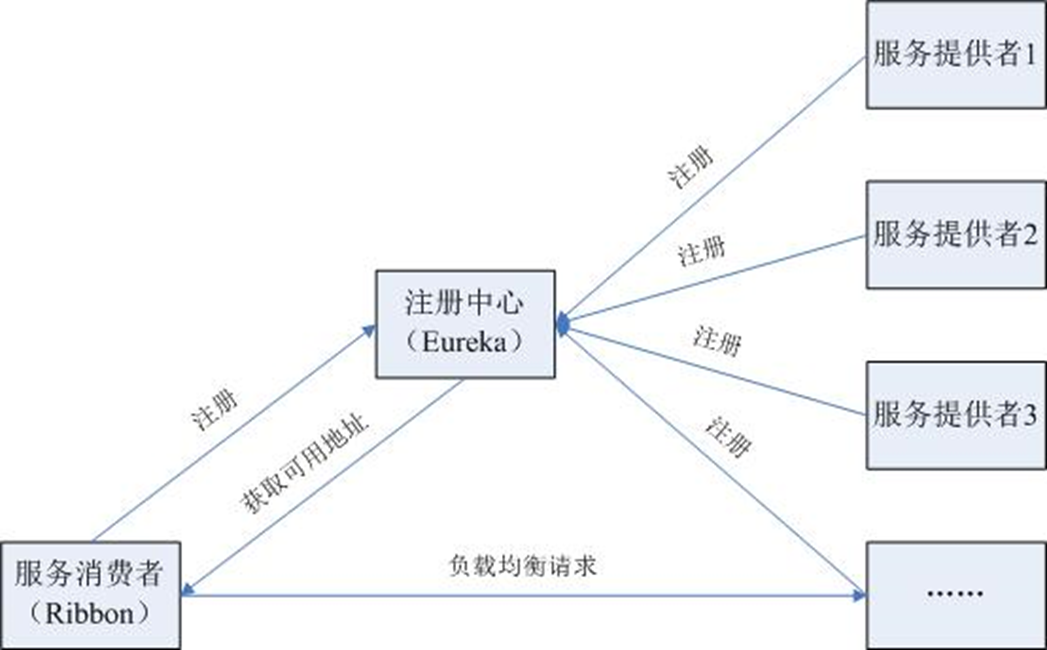
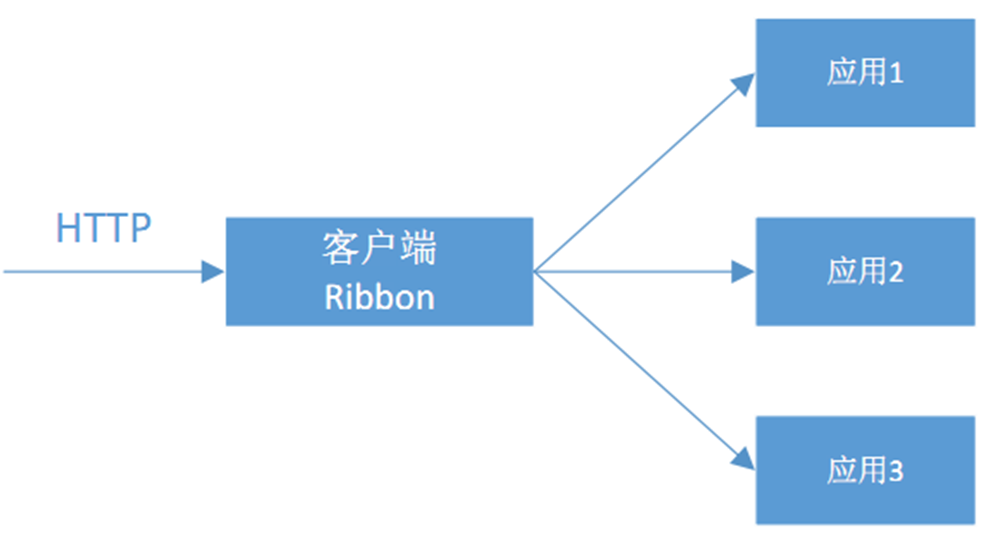
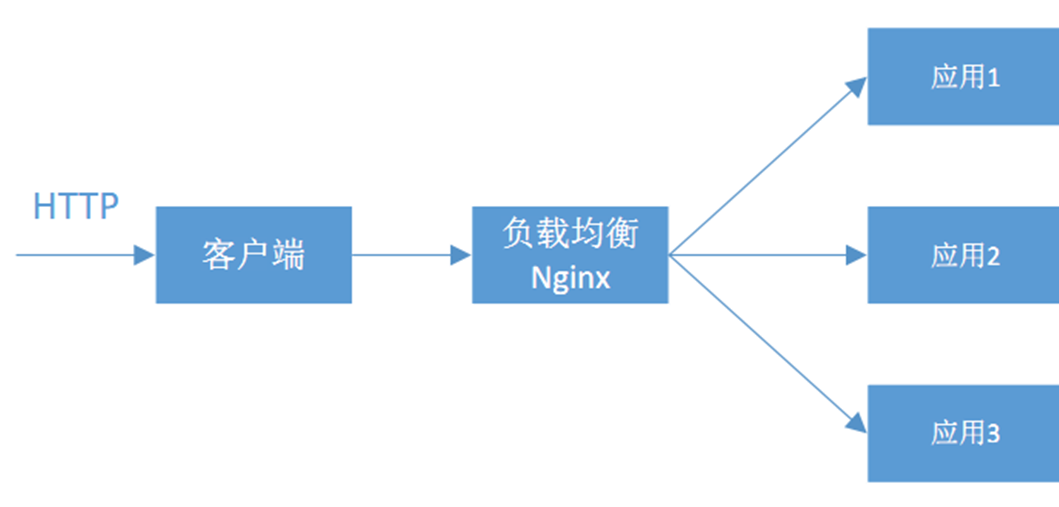
Spring Cloud Ribbon是一个基于Http和TCP的客户端负载均衡工具,它是基于Netflix Ribbon实现的。与Eureka配合使用时,Ribbon可自动从Eureka Server (注册中心)获取服务提供者地址列表,并基于负载均衡算法,通过在客户端中配置ribbonServerList来设置服务端列表去轮询访问以达到均衡负载的作用。
> eureka-client中包含了ribbon的包,所以不需要单独引入
如何修改调用策略?
- 代码中指定rule的规则
- 配置文件配置
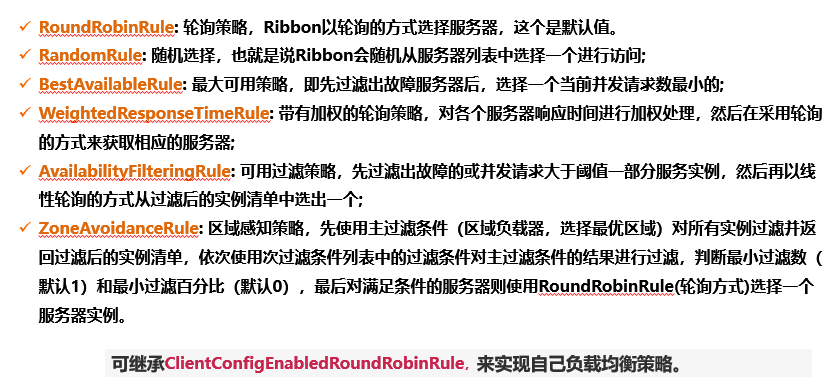
在bill-service中新建package,com.luffy.rule,注意不能被springboot扫描到,不然规则就成了全局规则,所有的ribbonclient都会应用到该规则。
package com.luffy.rule;

import com.netflix.loadbalancer.*;
import org.springframework.context.annotation.Bean;
import org.springframework.context.annotation.Configuration;

@Configuration
public class RandomConfiguration {

    @Bean
    public IRule ribbonRule() {
        // new BestAvailableRule();
        // new WeightedResponseTimeRule();
        return new RandomRule();
    }
}
修改BillController
import com.luffy.rule.RandomConfiguration;
import org.springframework.boot.SpringApplication;
import org.springframework.boot.autoconfigure.SpringBootApplication;
import org.springframework.cloud.client.discovery.EnableDiscoveryClient;
import org.springframework.cloud.netflix.ribbon.RibbonClient;

@SpringBootApplication
@EnableDiscoveryClient
@RibbonClient(name = "user-service", configuration = RandomConfiguration.class)
public class BillServiceApplication {
    public static void main(String[] args) {
        SpringApplication.run(BillServiceApplication.class, args);
    }
}
注释掉代码:
package com.luffy.ticket;

import com.luffy.rule.RandomConfiguration;
import org.springframework.boot.SpringApplication;
import org.springframework.boot.autoconfigure.SpringBootApplication;
import org.springframework.cloud.client.discovery.EnableDiscoveryClient;
import org.springframework.cloud.netflix.ribbon.RibbonClient;

@SpringBootApplication
@EnableDiscoveryClient
//@RibbonClient(name = "USER-SERVICE", configuration = RandomConfiguration.class)
public class TicketApplication {
    public static void main(String[] args) {
        SpringApplication.run(TicketApplication.class, args);
    }
}
修改配置文件:
server:
  port: 7001
eureka:
  client:
    serviceUrl:
      defaultZone: ${EUREKA_SERVER:http://admin:admin@localhost:8761/eureka/}
  instance:
    instance-id: ${eureka.instance.hostname}:${server.port}
    prefer-ip-address: true
    hostname: ${INSTANCE_HOSTNAME:bill-service}
    #eureka客户端需要多长时间发送心跳给eureka服务器,表明他仍然或者,默认30秒
    lease-renewal-interval-in-seconds: 2
    #eureka服务器在接受到实例的最后一次发出的心跳后,需要等待多久才可以将此实例删除
    lease-expiration-duration-in-seconds: 2
spring:
  application:
    name: bill-service
user-service:
  ribbon:
    NFLoadBalancerRuleClassName: com.netflix.loadbalancer.RandomRule
声明式服务Feign
从上一章节,我们知道,当我们要调用一个服务时,需要知道服务名和api地址,这样才能进行服务调用,服务少时,这样写觉得没有什么问题,但当服务一多,接口参数很多时,上面的写法就显得不够优雅了。所以,接下来,来说说一种更好更优雅的调用服务的方式:Feign。
> Feign是Netflix开发的声明式、模块化的HTTP客户端。Feign可帮助我们更好更快的便捷、优雅地调用HTTP API。
在Spring Cloud中,使用Feign非常简单——创建一个接口,并在接口上添加一些注解。Feign支持多种注释,例如Feign自带的注解或者JAX-RS注解等 Spring Cloud对Feign进行了增强,使Feign支持了Spring MVC注解,并整合了Ribbon和 Eureka,从而让Feign 的使用更加方便。只需要通过创建接口并用注解来配置它既可完成对Web服务接口的绑定。
https://github.com/OpenFeign/feign
对bill-service项目添加openfeign的依赖引入:
        <dependency>
            <groupId>org.springframework.cloud</groupId>
            <artifactId>spring-cloud-starter-openfeign</artifactId>
        </dependency>
启动类中引入Feign注解:
package com.luffy.billservice;

import org.springframework.boot.SpringApplication;
import org.springframework.boot.autoconfigure.SpringBootApplication;
import org.springframework.cloud.client.discovery.EnableDiscoveryClient;
import org.springframework.cloud.openfeign.EnableFeignClients;

@SpringBootApplication
@EnableDiscoveryClient
@EnableFeignClients
public class BillServiceApplication {

    public static void main(String[] args) {
        SpringApplication.run(BillServiceApplication.class, args);
    }

}
建立interface
package com.luffy.billservice.interfaces;

import com.luffy.billservice.entity.User;
import org.springframework.cloud.openfeign.FeignClient;
import org.springframework.web.bind.annotation.GetMapping;
import org.springframework.web.bind.annotation.PathVariable;

@FeignClient(name="user-service")
public interface UserServiceCli {

    @GetMapping("/user")
    public String getUserService();

    @GetMapping("/user/{id}")
    public User getUserInfo(@PathVariable("id") int id);
}
拷贝User类到当前项目:
package com.luffy.billservice.entity;

public class User {
    private int id;
    private String name;
    private int age;
    private String sex;

    public int getAge() {
        return age;
    }

    public int getId() {
        return id;
    }

    public String getName() {
        return name;
    }

    public String getSex() {
        return sex;
    }

    public void setAge(int age) {
        this.age = age;
    }

    public void setId(int id) {
        this.id = id;
    }

    public void setName(String name) {
        this.name = name;
    }

    public void setSex(String sex) {
        this.sex = sex;
    }
}
修改BillController
package com.luffy.billservice.controller;

import com.luffy.billservice.entity.User;
import com.luffy.billservice.interfaces.UserServiceCli;
import org.springframework.beans.factory.annotation.Autowired;
import org.springframework.web.bind.annotation.GetMapping;
import org.springframework.web.bind.annotation.PathVariable;
import org.springframework.web.bind.annotation.RestController;

@RestController
public class BillController {

    @Autowired
    private UserServiceCli userServiceCli;


    @GetMapping("/bill/user")
    public String getUserInfo(){
        return userServiceCli.getUserService();
    }

    @GetMapping("/bill/user/{id}")
    public User getUserInfo(@PathVariable("id") int id){
        return userServiceCli.getUserInfo(id);
        //return restTemplate.getForObject("http://USER-SERVICE/user/" + id, String.class);
    }
}
CICD持续交付服务消费者
拷贝user-service的交付文件,替换如下:
- user-service -> bill-service
- 7000 -> 7001
- INGRESS_USER_SERVICE -> INGRESS_BILL_SERVICE
$ kubectl -n dev edit configmap devops-config
...
data:
  INGRESS_MYBLOG: blog-dev.luffy.com
  INGRESS_SPRINGBOOTDEMO: springboot-dev.luffy.com
  INGRESS_USER_SERVICE: user-service-dev.luffy.com
  INGRESS_BILL_SERVICE: user-service-dev.luffy.com
  NAMESPACE: dev
...
创建develop分支,提交代码到gitlab仓库,验证持续交付
前面主要讲解了下服务消费者如何利用原生、ribbon、fegin三种方式进行服务调用的,其实每种调用方式都是使用restTemplate来进行调用的,只是有些进行了增强,目的是使用起来更简单高效。